Adding a New Host
Hosts can be added via the Manage ➡️ Hosts section of the Portal, or via our API.
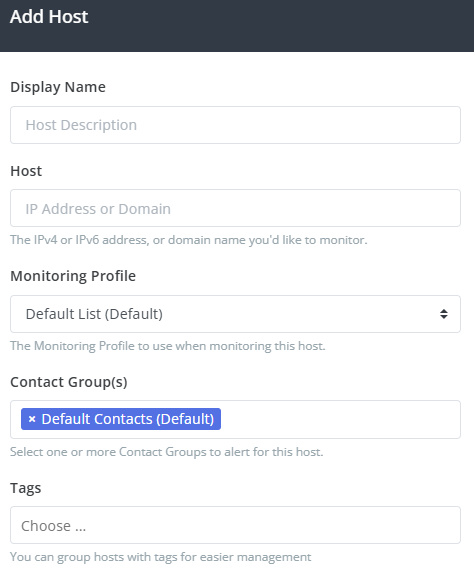
- Display Name is a description (label) used in the Portal.
- Host is the host value to monitor.
- Monitoring Profile is the Monitoring Profile to use to monitor this host.
- Contact Group you can select one or more Contact Groups to send alerts for this host.
- Tags optionally add one or more tags, for sorting and reporting.
Host Types
When creating a new host, the Host value can be one of:
- A single IP address (IPv4 or IPv6)
- An IP subnet (10.10.10.0/24)
- An IP range (10.10.10.10-10.10.10.20)
- A domain or host name.
IP subnet and range values will be grouped together for easier management, but all values will be monitoring separately.
Tags
One or more Tags can be added to hosts by typing the name of the tag in the Tags field and pushing enter. Previously used tags will show up in a drop-down list in the Tags field.
Tags can be used to group multiple like hosts together, and used for searching on the Hosts page.