Setting up Automatic Payments
Automatic payments can be configured via the Billing ➡️ Overview page of the Portal, for both customers on the Ultimate package and for customers on month-to-month packages.
Auto-Recharge: Ultimate Package
Customers on the Ultimate package can enable the Auto-Recharge feature on their account by selecting the Auto-Recharge button:

Click to enable or disable the auto-recharge feature, then select a falls below recharge-to amount and payment source:
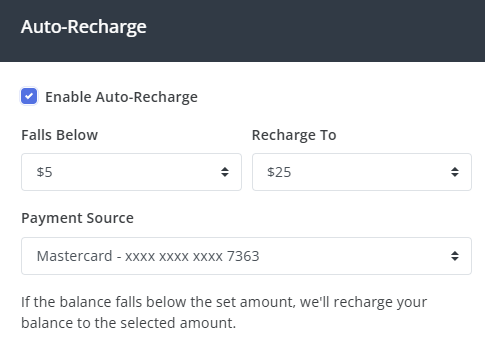
In the example above, if the account balance falls below $5, the auto-recharge process will take a payment from the selected credit card and bring the balance back up to $25.
Auto-recharge requires a valid credit card; auto-recharge is not supported from a PayPal account.
Auto-Renewal: Month-to-Month Packages
Customers on month-to-month packages (Professional and Enterprise) can enable auto-renewal of their current package:
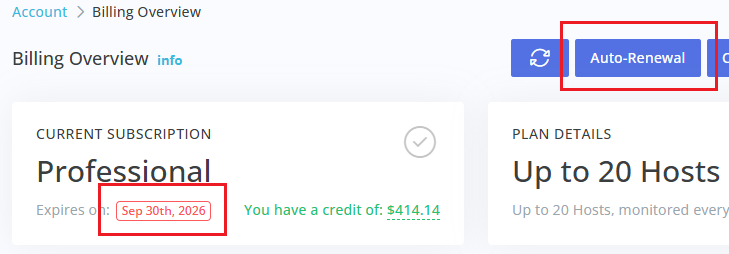
Click the Auto-Renewal option under your current month-to-month package, then click to enable the feature and select a payment source:
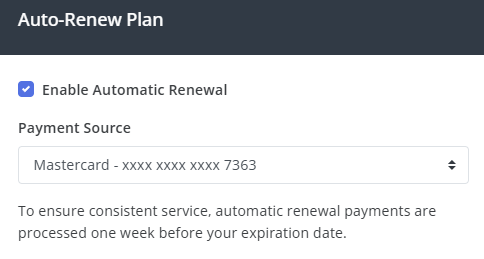
Auto-renewals are processed 7 days before the normal expiration date of the package and require a valid credit card; auto-renewal is not supported from a PayPal account.